
The way to Anchorpoint 2.0
Why we slowed down feature development to work on what matters most.
September 23, 2026
4
min read

TL;DR:
Lore's default S3/DynamoDB setup can't handle a large initial commit out of the box. Here's what actually gets a production AWS setup working:
Epic Games released Lore at Unreal Fest Chicago 2026. Lore is an open source version control solution optimized for large-scale media and entertainment projects, with a binary-first approach. Unlike Git, Lore is more centralized, leaning towards a sparse approach, which means you only consume the files you need. Its chunking mechanism splits binary files into smaller chunks, so that if you modify, e.g., a 3D model, you only upload the part of the binary file that has changed.
Because we are contributing to the Lore ecosystem, we had to set up a server on AWS for a proper production environment. The first initiative was to do a performance comparison between Lore, Git and Perforce. While that setup just used a virtual disk (an EBS volume), a larger production has higher workload and storage requirements, so using S3 as a storage solution seems like a desired solution.
As mentioned in our previous comparison article, we were experiencing throttling issues on the initial commit of an Unreal Engine project. The commits also failed. The reason is that initial commits of, e.g., 50GB and above create a huge number of requests on both S3 and the DynamoDB database required for Lore, and neither is prepared for this yet.
Lore is content-addressed. Every file is chunked into fragments (around 64 KiB each, 256 KiB at most), and each unique fragment becomes one S3 object keyed by its content hash, plus a couple of DynamoDB entries that track metadata and the repository referencing this data. Edit a few kilobytes inside a multi-gigabyte asset, and only the changed fragments get uploaded.
That design is what makes Lore fast for artists. It also means the request math is brutal. In our testing, importing a project produces roughly 12,000 S3 PUTs per GiB, plus about two DynamoDB writes and two to three reads for every fragment. A 500 GB project is around six million PutObject calls and well over ten million DynamoDB operations, uploaded with high parallelism. Two things have to be ready for that: the S3 bucket and the DynamoDB tables. Neither is ready by default.
A brand-new S3 bucket is a single partition. You can imagine that like a fresh mounted drive on Windows. It sustains about 3,500 PUT/s before it starts returning 503 SlowDown. S3 does scale out automatically (it splits the bucket's key space into more partitions under sustained load) but that happens gradually, over minutes to hours, and it happens behind a wall of slowdown errors while it catches up. That's exactly the throttling you hit on the very first import, when you can least afford it.
You can't turn this into a config value. There's no API to pre-partition a bucket. What you can do is ask AWS to do it for you ahead of time, and this is a normal request their S3 team handles routinely.
The reason it works cleanly for Lore is the key layout. Every object key is a 64-character hex content hash, stored flat at the bucket root. The keys are cryptographically uniform, which means the bucket can be split evenly on any leading-hex boundary with zero skew. This could be 16 ways, 256 ways or whatever they choose. Tell them this explicitly; it's what makes the request easy to grant.
How to do it:
Give AWS a few days of lead time. Pre-partitioning ahead of a scheduled import is the difference between a clean run and hammering a cold bucket until it catches up.
DynamoDB has the same cold-start problem, but here the fix is self-service.
A new on-demand table is provisioned for 4,000 writes/s and 12,000 reads/s. Above that it throttles until it scales, and on-demand only scales to roughly double your previous peak at a time. At two writes per fragment, an import running at 5,000 fragments/s wants around 10,000 writes/s per table. which is more than twice the default floor on day one.
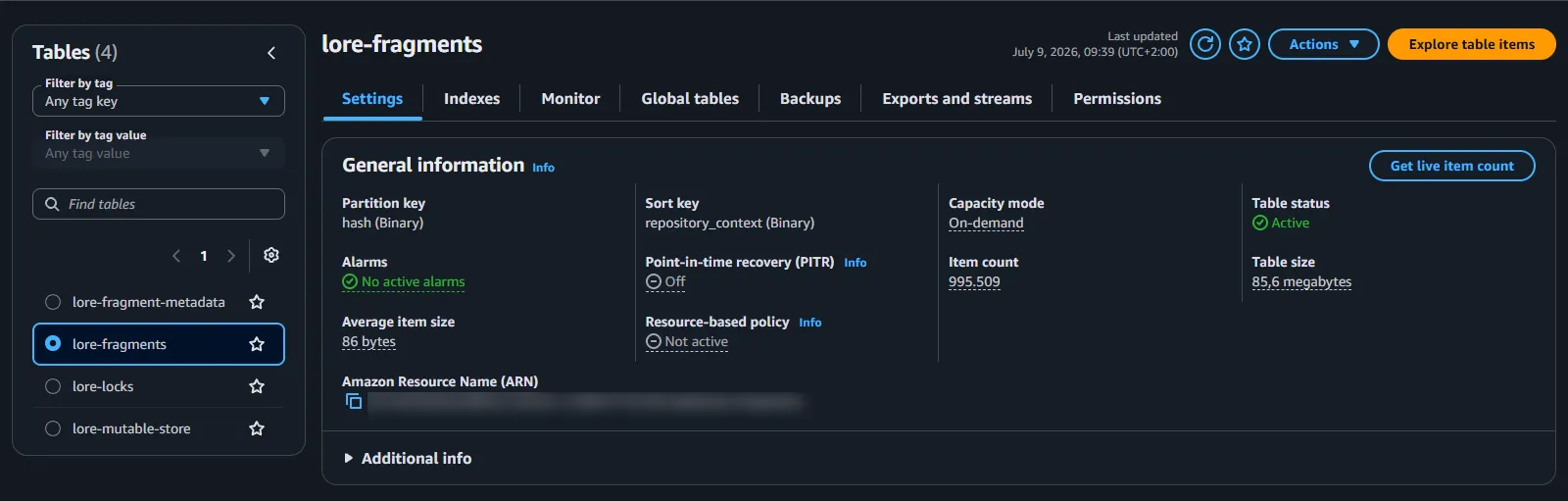

The fix is warm throughput, a one-time setting that pre-splits the table's partitions so the capacity exists instantly. It costs a few dollars per table, once, and the floor persists.
We warmed the two hash-keyed tables (fragments and metadata) to 15,000 writes and 40,000 reads per second. You can do it in the DynamoDB console (each table's warm throughput setting) or with one CLI call per table:
aws dynamodb update-table --table-name lore-fragments --region <your-region>
  --warm-throughput ReadUnitsPerSecond=40000,WriteUnitsPerSecond=15000
The update runs in the background. Expect anywhere from a few minutes to about an hour and the table stays fully available the whole time.
aws dynamodb describe-table --table-name lore-fragments --query "Table.WarmThroughput"The Status field reads UPDATING while the partitions split and flips to ACTIVE when the new floor is in place.
Leave the per-repository mutable-store and lock tables alone. Their traffic is light, and the mutable store's real constraint is a single hot partition key per repository, which warm throughput can't change anyway.
Everything above gets AWS ready. It still wasn't enough. Even with a pre-partitioned bucket and warm tables, our imports failed and this is the finding that surprised us most, so it's worth explaining properly.
A push has two phases. First the upload: the client streams fragments, the server writes each one to S3 and DynamoDB. That phase is bounded by the client and behaves fine. Then comes verification: before the server moves the branch pointer and confirms your push is safe, it walks the entire commit and checks that every single fragment is actually stored. For a large project that's millions of tiny existence checks, all at the end, all at once.
In the default mode = "aws" configuration, the server has no local memory of what it just did. It cannot answer "do I have fragment X?" without asking DynamoDB over the network and even for a fragment it received thirty seconds earlier. So verification becomes millions of individual consistent reads, fired concurrently from a single machine. Each one is small, but each one needs a connection and a round-trip, and the instance's network stack (packets per second, connection tracking) gives out long before AWS does. Connections stall, requests time out at the deadline, and the push fails. Not because AWS said no, but because the server drowned in its own questions.
Composite mode gives the server a local cache. It layers a local disk store in front of the S3/DynamoDB backend. Writes still go to AWS first and durability doesn't change. Because the cache only ever holds copies of data already committed to AWS, losing it is completely harmless. But as fragments stream through during the upload phase, the server also records them locally. So when verification runs minutes later and asks its millions of questions, the answers are already on local disk, microseconds away, no network call. The push fills the cache with exactly the answers its own verification will need.
That's also why a cold cache is never a problem. It doesn't matter whether the cache was empty when the push started or full of some other project. Verification only asks about this push's fragments, and those were written locally seconds earlier. The push always warms its own verification set.
Here's the config. The nesting is fiddly, so match it exactly:
[immutable_store]
mode = "composite"

[immutable_store.composite]
should_cache_query_results = true

[immutable_store.composite.local]
mode = "local"

[immutable_store.composite.local.local]
path = "/var/lib/loreserver/store"
flush_delay_seconds = 10
max_size = 268435456000      # 250 GiB

[immutable_store.composite.durable]
mode = "aws"
The durable tier's mode = "aws" points at your existing [plugins.aws.immutable_store] section, unchanged. Two things to watch:
Give the cache a real path on a dedicated disk. Leave path empty and Lore derives a temp directory that gets wiped on every reboot. We put the cache on its own 300 GiB gp3 EBS volume so it survives restarts and can never compete with the OS disk for space.
What is important: bare mode = "aws" is not a production configuration. AWS's own Lore module for the Cloud Game Development Toolkit builds its entire topology out of "edge pods, NVMe-cached nodes that clients connect to for push and clone."
A few loreserver defaults are tuned for an environment with a lot more headroom than a single node has. These go in your [plugins.aws.immutable_store] section (and the matching mutable/lock sections):
timeout_millis = 30000
s3_slow_operation_threshold_millis = 4000
dynamodb_slow_operation_threshold_millis = 4000
The one that matters most is timeout_millis. Its default is 5000, and that's the deadline for an entire SDK operation including all of its retries and backoff. The moment anything queues, every request dies at exactly five seconds and one overload cascades into total failure. We even saw it surface as a misleading "Address not found." At 30 seconds, congestion degrades into latency instead of errors.
The two slow-operation thresholds don't change how the server runs. They're purely there to make it observable. Each sets a millisecond bar above which the server logs a warning for an individual S3 or DynamoDB call. By default they're effectively off, so a slow operation passes silently right up until it crosses the timeout_millis deadline and fails. Set them to 4,000, which is a comfortable margin under the 30-second timeout and every slow call announces itself in the logs. During an import you can watch latency creep up while there's still plenty of budget left, instead of learning about it only when pushes start failing. It turns "the store is overloaded" from a surprise into something you see coming.
We are using the same testing setup that we also used in our comparison article. It's an Unreal project with a total file count of 392,559 and a total size of 63.5 GB that we want to push in an initial commit. We don't expected to achieve the similar performance like on an EBS volume but wanted to get close.
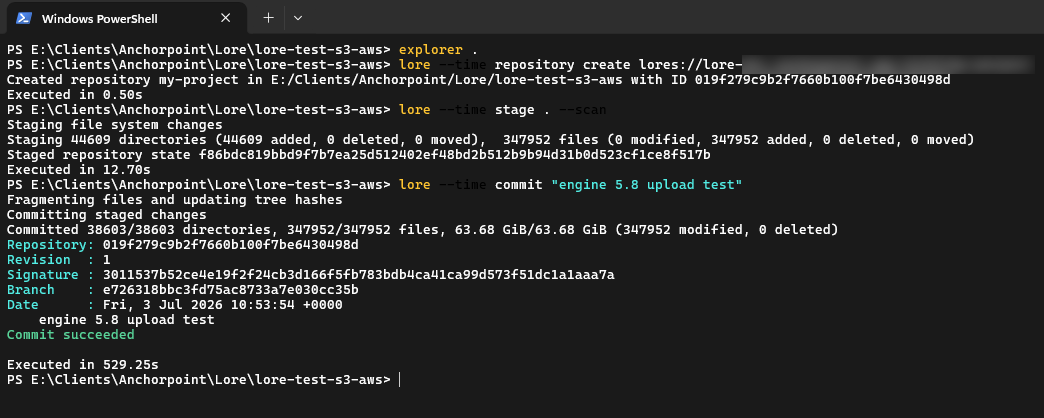

Lore commit (including staging) and Lore push results in a total of 545 seconds. Pushing to an EBS storage resulted in 316 seconds, which is 42% faster, but S3 allows infinite scalable storage.
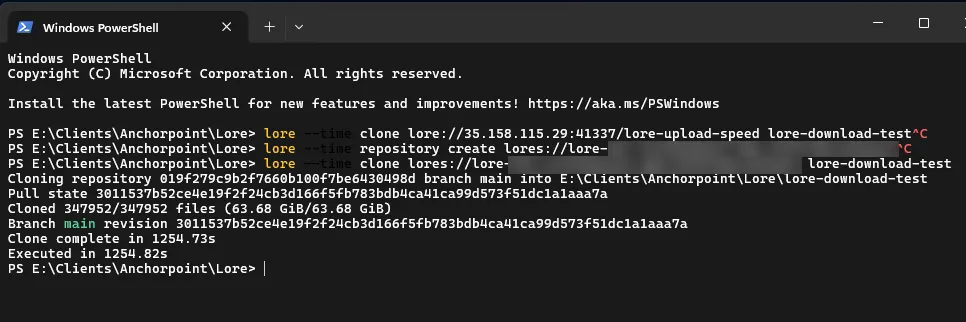
Cloning the repository resulted in a duration of 1255 seconds, which is also a pretty good result.
Everything above is one server doing the job well. The production shape Lore is built for is several.
Because Lore's data is content-addressed and immutable, a cache can never hold a stale answer, which makes horizontal scaling unusually clean. You run several cache nodes, each with its own local disk, all fronting the same S3/DynamoDB backend, so more clients can push and clone in parallel without any one node becoming the bottleneck. That's what AWS's Cloud Game Development Toolkit Lore module provisions: a set of NVMe-cached nodes it calls "edge pods" over a shared S3-and-DynamoDB durable backend, with CloudWatch logging and optional tracing, deployable as Terraform. Its default example runs two edge pods in a single region. An edge pod is the same idea as the node we built. It’s a Lore server with a local cache in front of the durable backend but just fleet-managed.
Spanning regions is a further, different step. Lore's topology model tags peers as same or other-region and can replicate between them, so geographically distributed nodes are part of the design but that's replication, not the shared-backend caching above, and the toolkit doesn't set it up for you..
We're doing all of this in the open as we build Anchorpoint for Lore, and contributing fixes back to Epic's server as we find them. If you're standing up Lore on AWS and run into something this guide didn't cover, we'd like to hear about it.