
Releasing Anchorpoint for Lore
Anchorpoint for Lore – a fast, visual desktop client for Epic's new version control system
September 21, 2026
3
min read

Update
In the initial version of the article, published on June 26, 2026, we included Lore with an S3-backed within the comparison. We decided to take this option out, and keep the comparison between all providers (Lore, Git and Perforce) using an EBS storage solution. Read our statement on Lore with S3 at the bottom of the page.
TL;DR
Lore performs up to 11 faster than Git LFS and 15 times faster than Perforce on an initial commit with a file count of 392,559 files and a total size of 63.5 GB.
Two weeks ago Epic announced Lore version control and released the source code via MIT license on GitHub. The initial reaction was insane. The repository has gathered more than 6.000 Stars after one week. Single developers and studios are interested on the promises that Lore is giving, by scaling up to repositories with 100s of Terabytes without any overhead. That is also the reason why we are building a Lore client.
FOSS is great and all, but we wanted to know if it’s any better/faster than the current options such as Git and Perforce. So we have embarked on the quest to find the answer.
We don’t claim for this test to be an absolute truth, but we have done a few things to make sure the comparison is as fair as possible. Please keep in mind the data gathered in this article is the result of a few runs of everything and results may vary, but this should be a good starting ballpark.
The goal of the test was to run an initial commit of a the Unreal Engine source code with an example project in it. We had run the same process using Lore, Perforce and Git.
We also tested using the default settings of each version control solution. We did not apply any performance tweaks or configuration that requires deeper knowledge of the tested solution.
Hardware
Software
On Lore we have used the version that was initially published after the official announcement. Depending on when you are reading the article, there will be newer versions of Lore out there that might influence this comparison.
The Server
We used a classic EC2 instance in a European region to stay close to our office.
ping -n 20 <ip> → Min 32ms / Max 33ms / Avg 32msThe Repository
An Unreal Engine 5.8 clone from GitHub (excluding the .git folder, with Setup.bat executed): https://github.com/EpicGames/UnrealEngine/tree/5.8
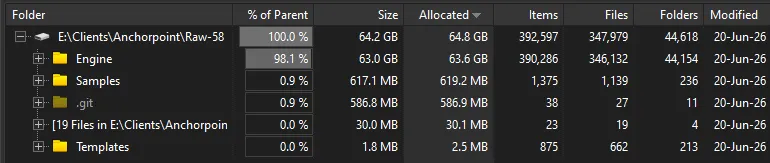
We used the exact same server configuration for each solution, writing the files to an EBS volume of the EC2 instance.
In contrary to Git, Lore uploads files on commit and not on push. Push in Lore is more like a publishing process, when the files are already on the server.
Lore excels when it’s storing files on an internal hard drive. This would be the common case in a studio with a self-hosted environment. Hard drives have the issue that they can run out of space, so you need to extend the system, so a better solution would be using an S3-storage solution. You can find more thoughts on Lore with S3 at the bottom of the article.
After uploading, Lore still comes out on top when it comes to compressed repository size:
Lore’s chunking mechanism plays very well when it comes to store compressed files, especially when you commit multiple versions of a file.
Even on downloading files via a clone, Lore excels, even if the difference is not that big compared to the initial commit.
A quick technical explanation of our parameters.
Install via: curl -fsSL <https://raw.githubusercontent.com/EpicGames/lore/main/scripts/install.sh> | bash -s -- --server
local.toml
[immutable_store.local]
path = "/data/lore"

[mutable_store.local]
path = "/data/lore"Running via Docker using this image: https://github.com/hawkmoth-studio/perforce-docker
We also used the typemap from this article: https://dev.epicgames.com/documentation/unreal-engine/using-perforce-as-source-control-for-unreal-engine
Running via Docker using this image: https://github.com/go-gitea/gitea
What we did here is unconventional and we don't advocate for it. It's possible, but in most cases teams are better served by forking the official UE repo and working from there.
However, to make this comparison fair, we did a few things:
git clone of the repo were submitted as plain filesSetup.bat were marked as LFS and submitted as suchTo achieve this, we deleted the .gitignore and used the following gitattributes
Again, don't do this at home — but we needed to ensure fair compression. In practice, always use a .gitignore.
Because disks can run out of space, S3 storage is the ideal solution for large, terabyte-sized projects. Infinite scale, no disk swapping, and usually a lower cost per GB are the expectations when integrating S3.
While it's pretty easy to configure a Git server (using Gitea) to offshore LFS files to an S3 bucket, and while Perforce also introduced S3 support in 2024, we wanted to know how Lore performs in that area.
It's possible, and it comes with great performance results, but it's not a trivial endeavor to get there. Our setup required tweaking many parameters and a lot of these outcomes are based on the proper configuration on AWS, so we decided not to bring this up in this comparison. Furthermore, we also wrote a guide on how to setup Lore on AWS with S3.
Committing a large repository to Lore's S3 backend runs into throttling from both S3 and DynamoDB. We hit this on a repository of only 63 GB. There are many reasons why this happens.
Unlike an EBS volume, where you can simply set up, push, and upload a huge amount of content, S3 storage and DynamoDB are designed to scale infinitely, but also to adapt to your usage. Once set up, these services don't expect high usage upfront, but rather a gradual increase in requests as you scale step by step. This is common when a service launches with just a few users but grows over time.
Pushing an initial commit using Lore creates a heavy load of PUT requests. Lore's chunking splits files into multiple pieces, so you have to multiply the number of files by the number of chunks per file to get a rough estimate of how many requests Lore will send to your S3 bucket. This isn't typical behavior when setting up a fresh S3 bucket.
You need to warm up your bucket as well as your database to prepare them for such a high workload. This isn't something you can do on your own as it requires contacting an AWS support agent.
We also enabled Lore's composite store, which is a local EBS disk acting as a read cache in front of S3 and DynamoDB. All data is still written to AWS first; the cache exists because a push ends with the server re-verifying every chunk it just received. Millions of those lookups against local disk are trivial; the same lookups as individual DynamoDB calls overwhelmed a single node. In our testing, the composite store was the difference between failing and uneventful imports. This is a requirement, not a tuning knob.
Since Lore's default settings are optimized for large-scale server environments, they aren't optimal when using a single EC2 instance. We had to configure timeouts and other parameters so they fit our setup. Besides that, the Lore server by default allows too many concurrent existence checks, which again isn't optimized for single-EC2-instance usage as it creates too many requests.
create: 0.5s
stage: 12.70s
commit: 529.25s
push: 3.46s
download: 1254.82s
We think these results are still great compared to other solutions out there. As Lore progresses, and with even better server configuration, results can improve further. Over time, the benefits of using S3 storage over EBS will definitely outweigh the initial setup hurdle.
We're looking at a non-production-ready version of Lore, and the EBS storage results look really promising. We still need to evaluate how Lore performs over time as the repository grows. Based on its design, it offers cheap branching and commit count shouldn't affect performance at all — that needs follow-up testing.
It definitely looks like the ultimate solution for large, binary-heavy projects.