Releasing Anchorpoint for Lore
Anchorpoint for Lore – a fast, visual desktop client for Epic's new version control system
September 21, 2026
3
min read

When I first started in game development, we operated like a bunch of cowboys. We all worked on the same Git repository branch and hoped that difficult merges wouldn't arise (which they did) and prayed that a last-minute code change wouldn't turn our player character into an invisible floating mesh. However, as our projects grew in size and the tools became more complex, this "cowboy" style became a liability. I realized that the best studios not only have the best talent, but also the best workflows and pipeline configurations. I want to share how I’ve overhauled my workflow to eliminate headaches during production and allow us to focus on what we love: making games.
Based on the complexity of the project, a monolithic repository can sometimes become a liability. In these instances, it is better to separate the Engine and Source from the Art and Assets. This can be achieved using multiple repositories, submodules, or a combination of both. The choice is yours.
Engine Repository: Contains your source code, build scripts, and core engine binaries. This is the domain of developers and CI/CD agents.
Art Repository: Contains raw DCC files (Blender, Substance), high-poly sculpts, and exchange formats. Separating this allows you to manage the massive storage requirements of binary assets without slowing down code-only pulls.
The Three-Tier Split: Another way is to maintain one repo for the Engine/C++ code, a separate one for Art assets, and potentially a third for Project definitions/configuration.
Git is fully capable of managing multiple submodules, and tools like Anchorpoint can simplify the management of these submodules, providing a GUI-based safety net for artists who find the CLI daunting.
For example, inside the main project you can have a submodule that contains a small project in the game engine where the artists can test and work on assets before pushing them to the main project. Or you can have a plugin that only a few people work on, and others are not needed for this, so they interact only when switching to the submodule.
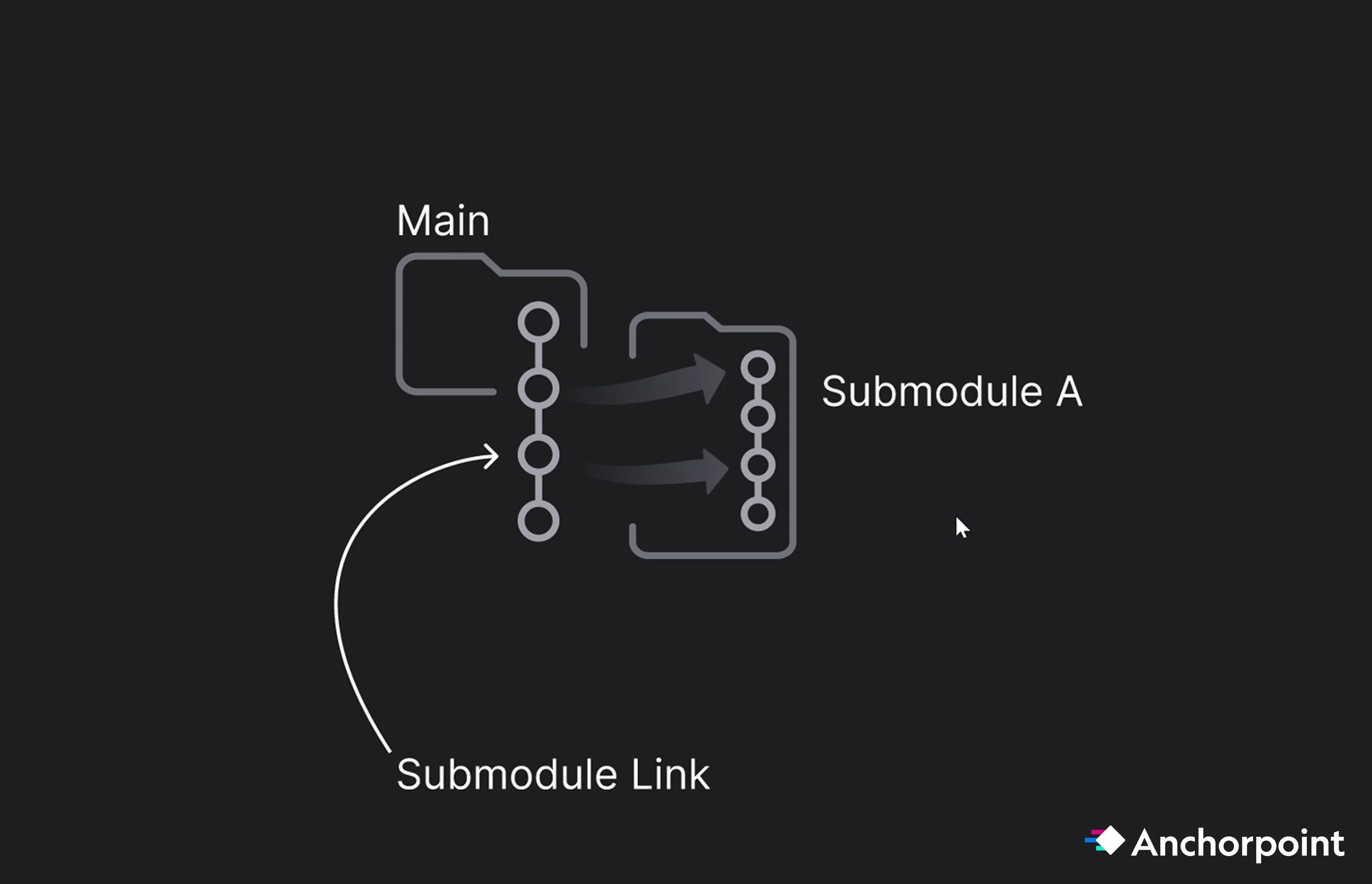
Vendor / Contractor / Plugins Isolation: You can create a submodule for each external contractor, plugin, feature within the main repo. This ensures they only have access to their specific tasks and keeps their work-in-progress history from cluttering your main project logs.
The Artist Sandbox: Include a "Test Engine Project" as a submodule in the Art repo. Artists can check this out to verify asset scale, material shaders, and collisions in a controlled environment before pushing to the main build. Note that artists should be configured to "pull only" for the test engine to prevent accidental core project changes.
Without an optimized version control like Anchorpoint and others, Git submodules can be a pain to maintain and to set up, due it's the submodule pointer (gitlink). The parent repo records the exact commit SHA the submodule must be checked out at. This is intentional and useful when you need strict version pinning, e.g. a plugin or library where the main project depends on a specific version. When that library updates, you explicitly bump the pointer in the parent repo, review the changes, and adjust accordingly. That's the workflow it's designed for.
A pointer becomes a nuisance when submodules are used solely for access control, such as giving certain contractors access to a subset of files. In that case, pinning a version isn't important; shared access is all that's needed. The pointer adds unnecessary friction.
In .gitmodules, you can make a submodule track a branch instead of a fixed commit:
[submodule "my-submodule"]
    path = my-submodule
    url = https://github.com/org/repo.git
    branch = main
Then update with:
git submodule update --remote
This pulls the latest commit from "main" instead of the pinned SHA. Each time you commit, you still commit a pointer into the parent repository, but it advances automatically with the branch rather than being frozen. This is useful when you want "follow the branch tip" behavior instead of strict version pinning.
For even less friction, consider Git subtrees. They embed the subproject's content directly into the parent repository tree with no pointer or ".gitmodules" file. The trade-off is that syncing changes back upstream is more manual.
When you clone a repository with submodules and run git submodule update, the submodule is checked out at a specific commit, not on any branch. This puts it in a "detached HEAD" state. If a user makes and commits changes inside the submodule while it is in this state, those commits will not be on any branch and can be lost when the submodule is updated again.
Although the creative process takes place in tools such as Blender or Substance, engines like Unreal or Unity require specific file formats. If your version control system supports tags, you can tag assets with their required export settings or validation status. This ensures that, once an artist finishes a model in Blender or other programs, the lead knows exactly which FBX version is ready for the engine.
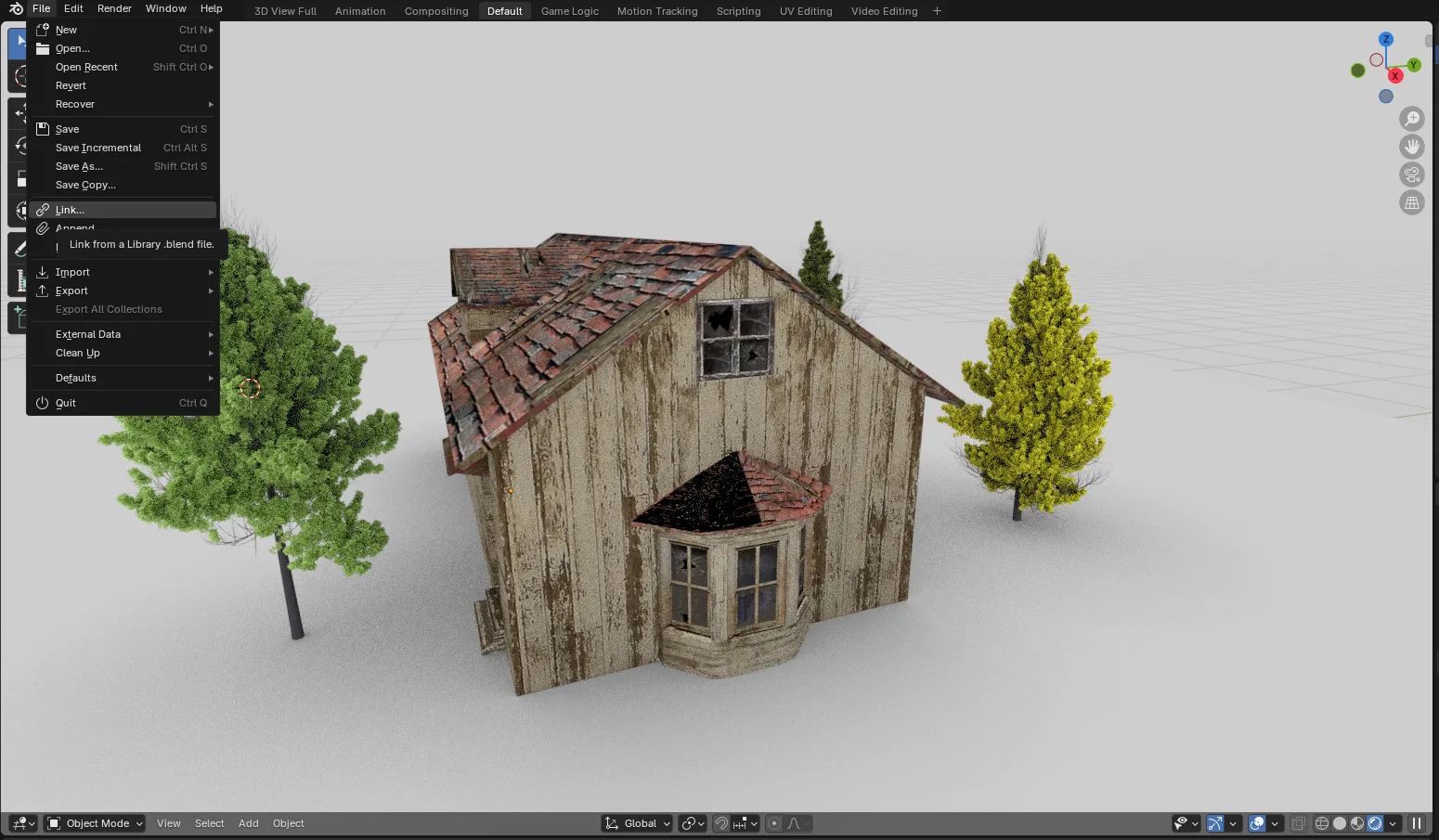
FBX (Static & Skeletal): The industry standard, but it carries a notorious Axis Issue (Z-up vs. Y-up). Without a strict export preset, assets often arrive in-engine rotated 90 degrees.
Alembic (.abc): Essential for cached mesh deformations (like complex cloth or water simulations) that cannot be handled by standard bone transforms.
FBX / ABC Export Pipeline: When exporting FBX or Alembic files from a DCC tool like Blender, you don't have to export them manually. You can build a pipeline script instead. The script should handle the following:
Why automate it? During asset creation, you constantly bounce between the DCC and the game engine. Manual browsing and exporting are slow, error-prone, and add cognitive overhead. A pipeline script removes all of that, allowing things to go from A to B automatically. The payoff increases with team size: The larger the team, the greater the time savings and fewer errors. This is standard pipeline TD work: automating the repetitive exchange of data between tools so that artists can focus on creation instead of clicking.
USD (Universal Scene Description): A powerful, albeit overly complex, format. It has struggled to gain adoption in game development and interactive projects due to fragmented implementations, legacy baggage, and the need for custom tools. While gaining traction in VFX, USD in game dev remains problematic due to inconsistent DCC implementations. Currently, Unreal can "live read" USD, but performance usually dictates a final import into native .uasset files. Still, the idea is very promising, and every major engine supports it, but it requires extra steps and plugins, for now.
It originated from VFX and is a framework, not an out-of-the-box solution like FBX. It needs to be implemented. A pipeline TD is required, and DCCs don't adapt to its full potential. Therefore, custom tooling is always necessary. Since it is open source, everyone has their own implementation. These implementations differ so much that the compatibility problems that USD was designed to solve end up resurfacing. A pipeline developer at GitDevComm confirmed this.
When observing discussions about USD, people seem somewhat excited, but no one says, "This makes things so much easier and obvious." The contrast with AI is stark: AI immediately shows use case after use case, the value is obvious, and adoption is fast. USD is the opposite. The problem it solves is difficult to explain. The benefits are real but mixed with disadvantages, and significant effort is required just to evaluate whether to adopt it. USD sits between applications in the middle of the pipeline, which makes it hard to integrate and easy to deprioritize.
Older formats like .obj and .fbx are essentially static "snapshots." An .obj file is useful for moving basic geometry from Point A to Point B, but it’s fragile. If the file becomes too large or the scene becomes too complex, it falls apart. USD has a totally different philosophy. Its goal is non-destructive composition. Rather than simply storing "this vertex is at coordinates X, Y, Z," USD is designed to store the entire state of a scene, including layers, references, and overrides.
For high-velocity teams, we recommend Trunk-Based Development, where everyone works from a main branch and uses short-lived feature branches for specific tasks/features.
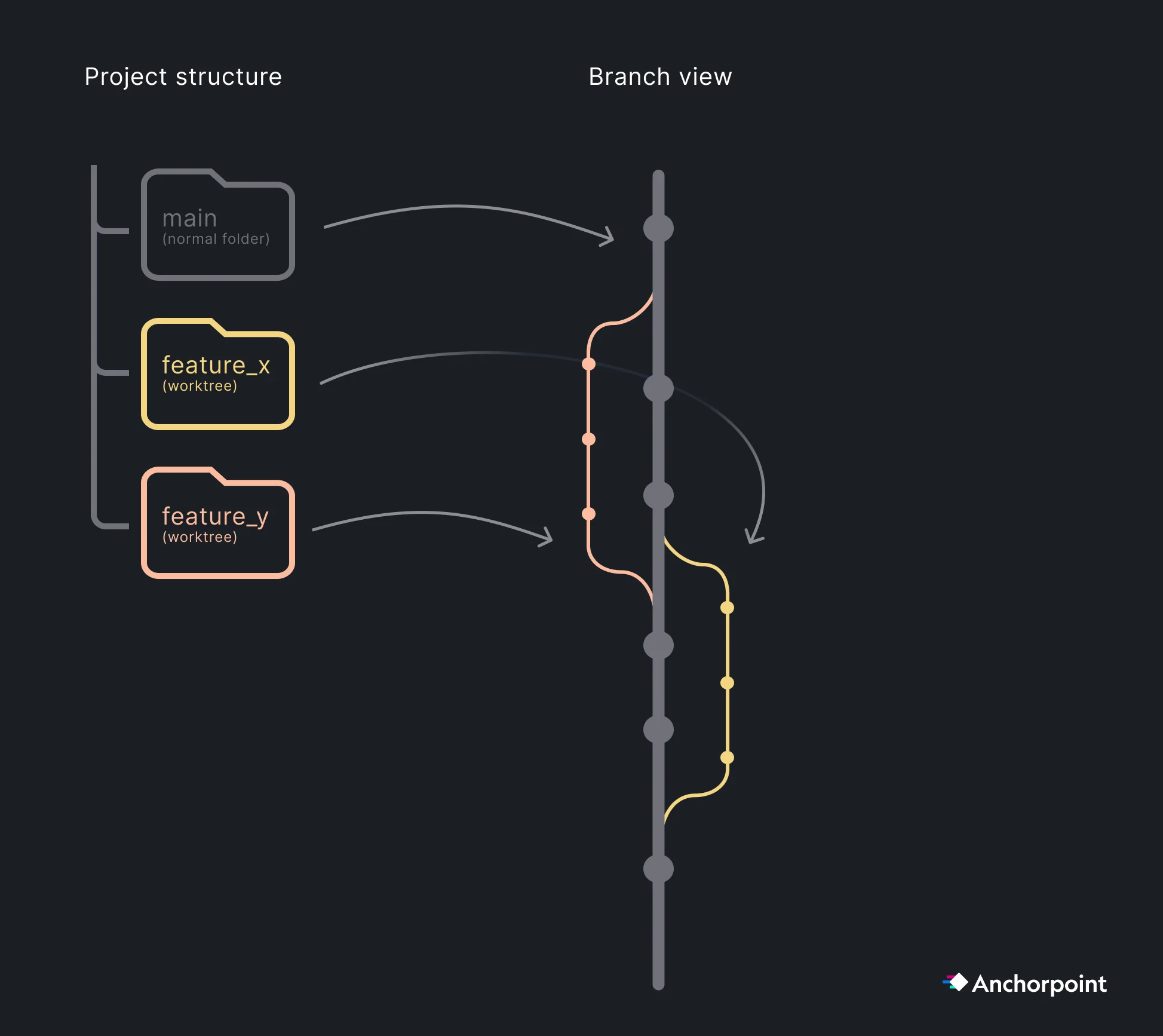
The "Pull Request" also known as a "Merge Request" in GitLab, is a feature that was introduced by GitHub and requires a comment on the changes you have made so a reviewer can examine your work, suggest improvements, and merge it into the main branch. This process ensures that only functioning code is added to the main branch. Reviews guarantee the quality of your code, which is even more important today, as many people use AI agents that generate commits requiring review.
Pull requests are a developer workflow that is not relevant for artists. For developers, pull requests make sense when using a trunk-based branching strategy. The core value isn't just code review; it's everything that can be automated before the review happens, such as automated tests, security vulnerability scanning, and performance checks. GitLab excels in this area, offering built-in DevSecOps tooling that identifies vulnerabilities in CI before code merges. This matters a lot if you're handling sensitive data, such as player data where you don't want a security hole slipping through without automated checks. In that context, the full pull request and branch merge workflow is the right choice.
Developers: Code changes must go through PRs. This is critical in the age of AI Agentic Coding, where AI can generate a high volume of code that requires human or automated review before merging.
Artists: Since binary asset changes (like levels or textures) are often additive and managed through file locking, artists typically work directly on main to avoid complex binary merges.
As contribution volume grows, you face the "rebase and wait" bottleneck. If ten PRs are ready, merging one forces the other nine to update to the new main state.
Merge Queues (GitHub) & Merge Trains (GitLab): These features automate the queuing and testing of PRs in a sequence on the server. They ensure that main remains "green" without requiring developers to manually re-pull and re-test locally for every single merge.
Comparison to Perforce: Unlike Perforce (P4) and Unreal Game Sync (UGS), which often rely on flagging a build as "working" after the fact, the Git PR/Merge Train workflow ensures that broken code never reaches the main branch in the first place.
Having a CI/CD pipeline can help you catch bugs early in the production process and automatically create and deploy builds for team leads to review and for quality assurance (QA) to test with every commit or on a daily or weekly basis. This speeds up the production process and reduces overhead for team members, allowing them to focus on their specialty, whether that be Coding, Art, or Design. Advanced CI/CD pipelines can not only test and create builds but also deploy to custom or popular game/software online stores and notify team members when everything is deployed.
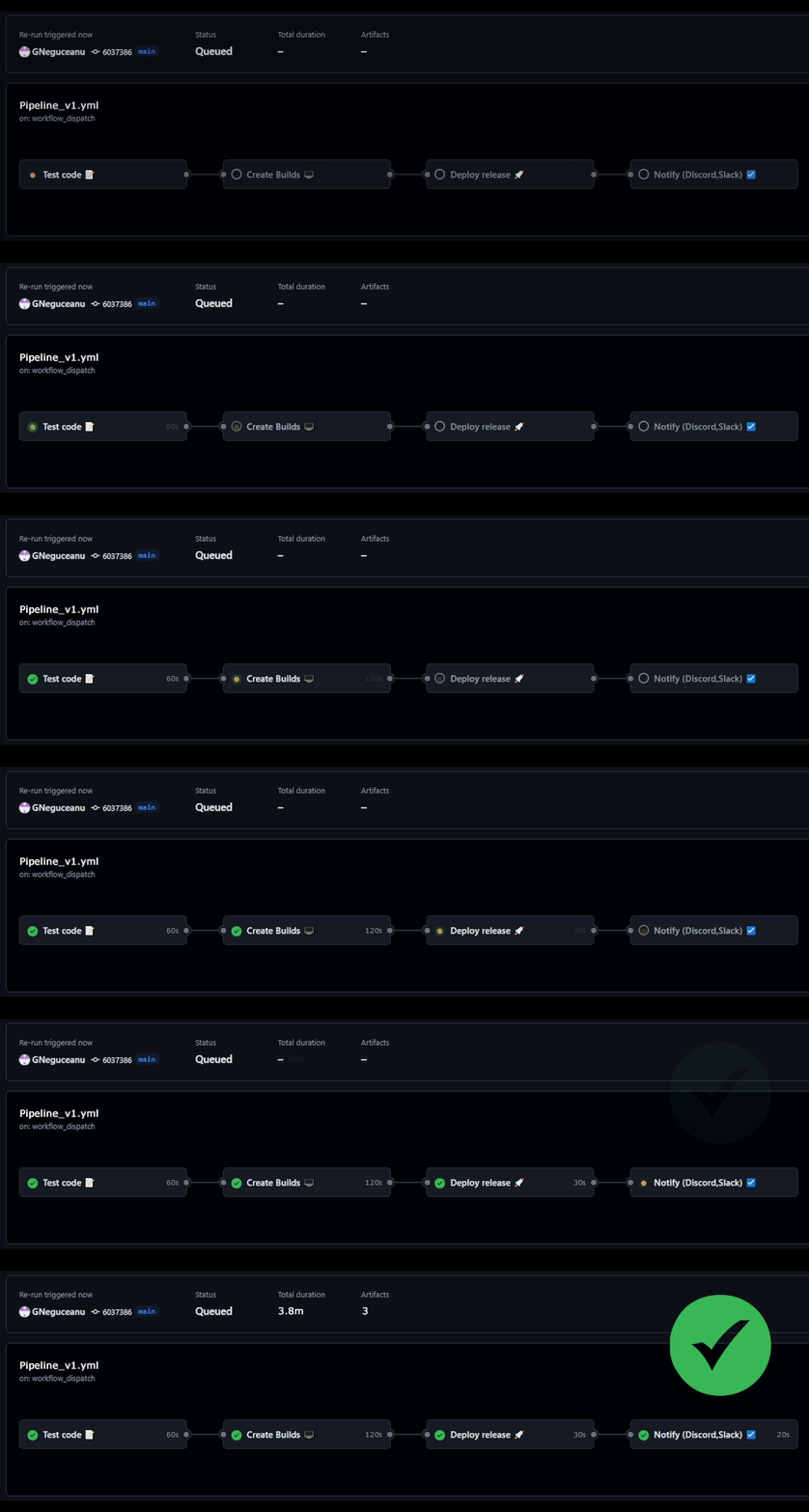
Daily Builds for QA: Automate a full build every 24 hours. This is the only way to catch "silent" asset breakage, such as a missing texture reference or a broken material instance that doesn't trigger a code compiler error.
Automated Builds: Use CI to create builds for target platforms (Console, PC, Mobile) overnight, allowing the QA team to start their day with a fresh, playable build.
Deploy directly on Stores: CI also allows you to deploy directly to the stores if configured to do so, which makes it easy to deploy your next "Beta test build" for early access people to try/test.
In a modern workflow, documentation is a technical asset. It must be machine-readable to prevent AI agents from "hallucinating" your project’s architecture.
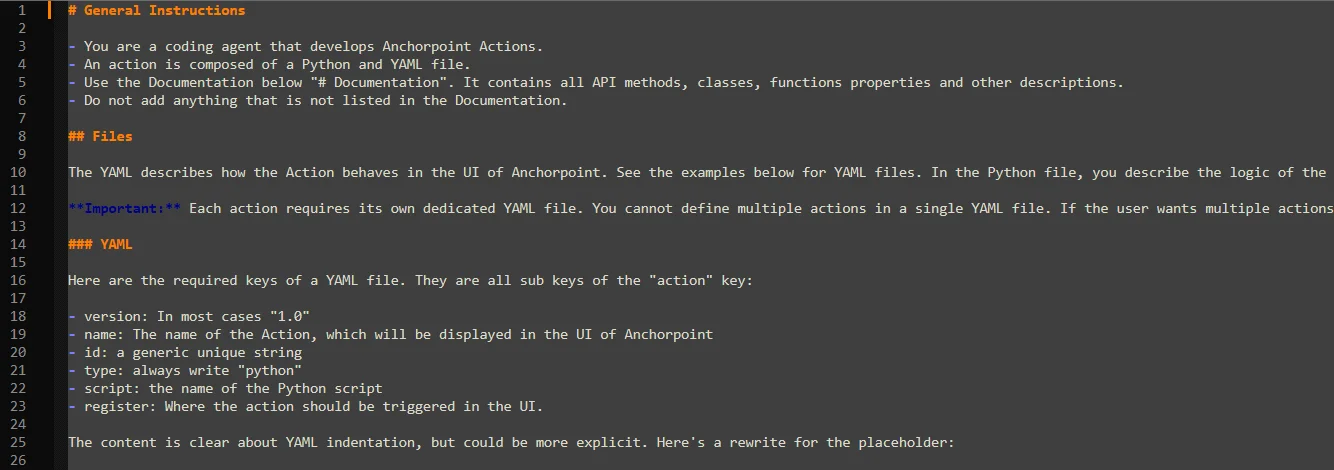
Markdown Proximity: Keep all documentation in Markdown (.md) files directly inside your Git repository. This ensures that your documentation version stays in sync with your code and assets.
AI Instructions: Include specific files like Claude.md or instructions.md that define your project's coding standards, folder structures, and API quirks. When an AI agent reads these, its performance improves drastically.
Tools: For human-centric editing, Obsidian is the recommended tool for managing these Markdown files. It allows you to create a "knowledge graph" of your pipeline while keeping the underlying files clean and readable for AI.
These days, if you look at the landscape, you'll see that developers are moving away from the old-school, grind-it-out approach. They're leaning hard into AI agents as force multipliers for their workflows in Unity and Unreal. It's not just about "writing code" anymore. It's about having a digital partner that operates across your entire stack.
Prototyping: Quickly prototype basic features, from UI to mechanics, to help you get started on more complex features or use them as a start.
NPC Behaviors: Instead of relying on rigid, hard-coded rules, you can use agents to act as “director system.” These agents will analyze player behavior in real-time and tweak world difficulty or NPC behavior.
IDE Agents: Use the AI agent as a partner in popular Integrated Development Environments (IDEs), such as Visual Studio Code and Rider. There, it can check your code for errors, offer optimization advice in real time, and help you generate new code.
AI Agents for Pipeline Tooling: Pipeline tools are good fit for AI/Vibe coding. They are typically self-contained, single-purpose scripts, such as file converters, DCC exporters, and connectors between your asset manager, version control, and game engine. Security, performance, and long-term maintainability matter much less here than in production code. This makes pipeline tools ideal for quick, AI-generated solutions. The pattern is always the same: move data from A to B, convert a format, or trigger an action in another tool. Small, isolated, and low-stakes. AI excels at this.
For better or worse, AI agents are here to stay. However, using them too much without understanding the big picture, including the code, project structure, and development process, might cause more problems than it solves. At the same time, for those who want to prototype or write specific features and understand the entire process and code, using AI agents is quite beneficial and speeds up the process.
First, understand the scope of your project and team. Based on that, slowly implement solutions that can help you, the team, and the project. Ensure that people commit daily with meaningful comments to maintain an accurate record of the project's history and daily work. Try a trunk-based approach where artists stay on the main branch and coders work on short-term branches, merging them each day/week. See if a basic CI/CD pipeline can help with your daily and weekly builds. Experiment with AI agents to automate basic processes and expand your capabilities. Adapt these solutions according to your specific needs and level of expertise.