In this guide, we explain why most CAD workflows fail, explore the best alternatives, from user-friendly tools like Anchorpoint to the classic power of free SVN.
George Neguceanu
20 May 2026
Updated on
20 May 2026
5
min read
Content
TL;DR:
Anchorpoint: A Git-based solution optimized for asset pipelines. It features fast file-locking to prevent overwrites, works well with Git hosts like GitHub, and is much more accessible for non-technical team members.
Autodesk Vault: The industry standard for enterprise environments utilizing multiple CAD tools. It offers strong automation but comes with significant “vendor lock-in” and a steep, corporate-focused learning curve.
CAD ROOMS: A cloud-native, modern challenger that supports 35+ CAD formats. It offers a web viewer for stakeholders and removes the need for on-premises server maintenance.
Onshape: A complete overhaul of the design pipeline where CAD and PDM exist in the same cloud-based browser environment. It eliminates file-locking by allowing real-time, concurrent editing, though it requires total commitment to their ecosystem.
Subversion (SVN) with TortoiseSVN: The “old school” free and open-source option. It is extremely reliable but lacks “CAD intelligence” (it doesn’t understand assembly dependencies) and requires manual management of file links.
If you've ever spent an afternoon searching for a missing assembly file, only to realize that a coworker had overridden your design two hours earlier, then you're familiar with the frustration of unmanaged files. This is where a product data management (PDM) system comes in handy.
At its core, a PDM is a centralized vault for design, engineering, and pipeline files. It handles version control, manages file check-ins and check-outs to prevent duplicate work, tracks historical revisions, and maps out complex bills of materials (BOMs). In short, it prevents teams from interfering with each other's work and ensures that everyone builds from the same master copy. While it handles all these things, what if a more complete solution were available?
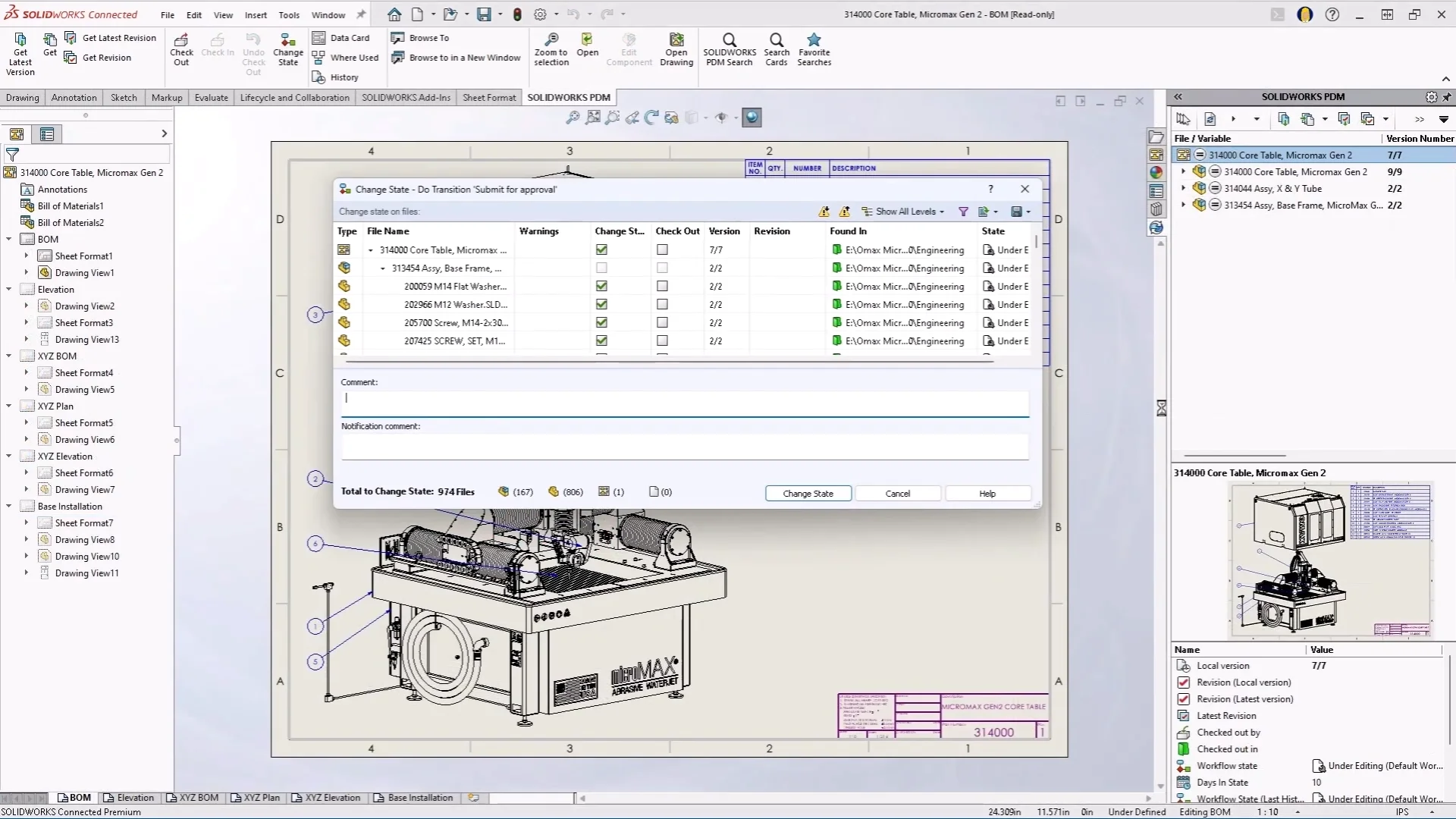
Submitting an asset for approval in Solidworks PDM
Solidworks and Solidworks PDM
If you work in mechanical engineering or heavy 3D design, SolidWorks is probably your primary tool. Dassault Systemes naturally offers its own ecosystem solution: SolidWorks PDM, which is available in Standard and Professional tiers. Solidworks PDM integrates directly into Windows Explorer and the native Solidworks interface. This allows teams to automate PDF creation, manage revision histories, and control access to specific parts.
But let's be candid, SolidWorks PDM comes with its share of baggage.
Infrastructure Overhead: It relies heavily on on-premises servers, which can create IT management challenges for remote or distributed teams.
Rigid Search Tools: The search functionality is limited. If you don't know the exact file name or specific custom property metadata, it's difficult to find what you need.
Cost & Lock-in: High licensing fees and severe vendor lock-in make it difficult to justify for smaller teams or multidisciplinary environments.
5 SolidWorks PDM alternatives
1. Anchorpoint
Let's start with Anchorpoint, a version control solution that is 100% compatible with Git. Unlike traditional PDMs, which focus strictly on mechanical blueprints, Anchorpoint is built to handle asset pipelines and resolve file distribution and collaboration issues between technical and non-technical team members. It is designed for users such as artists who need simple guidance through technical workflows without being overwhelmed by complicated deployment steps.
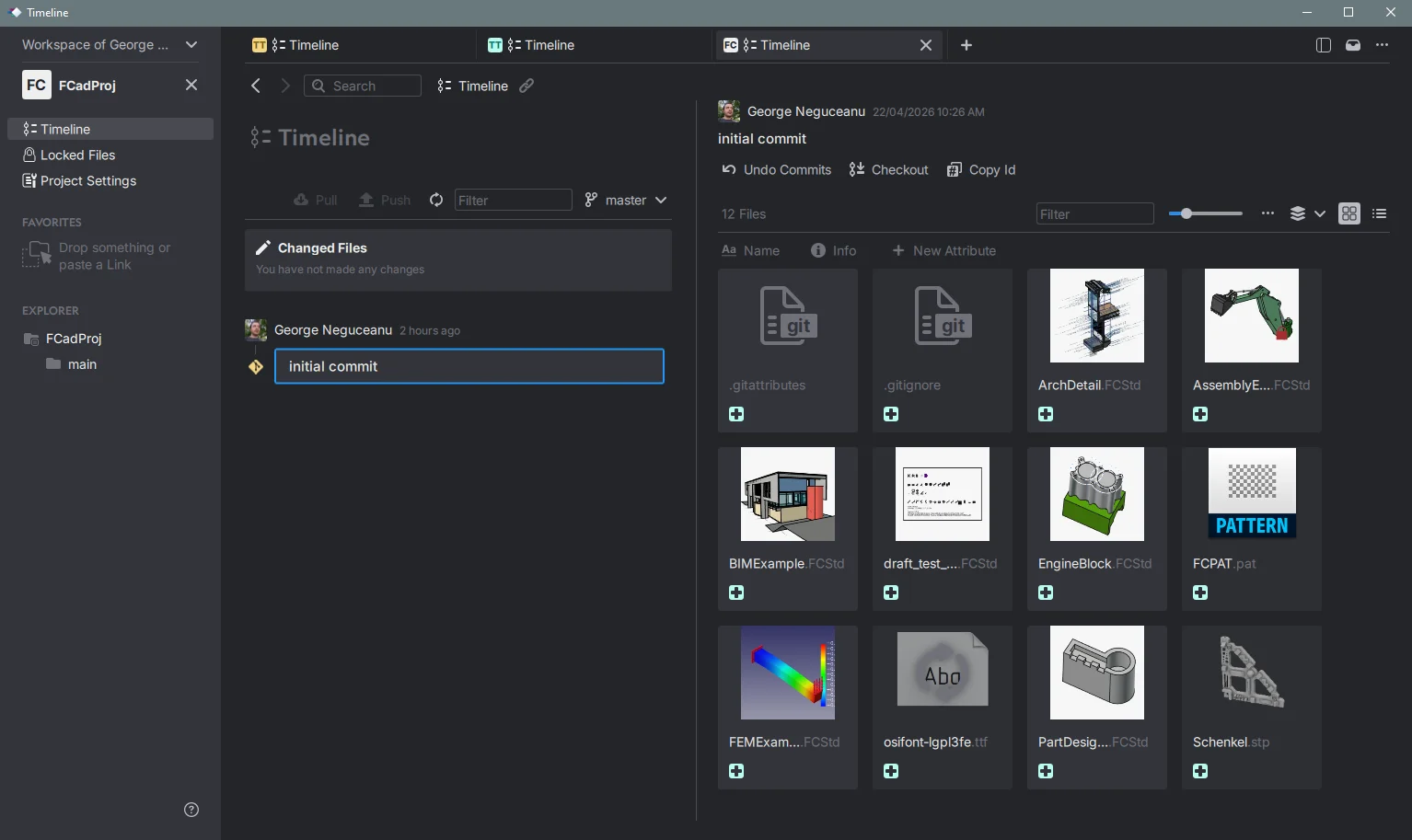
Managing a FreeCAD project with Anchorpoint
Pros: It is fully integrated with Git, allowing teams to cleanly push files to platforms like GitHub, Azure, and self-hosted servers. It features a fast file locking system that can lock 1,000 files in under a second, eliminating conflict issues and it uses a cloud metadata system that enables quick file tagging and deep asset searching.
Cons: Like standard Git, it requires users to have their local repository completely up to date before pushing files. It is also not designed to grant asset access to external marketing or sales teams, like a Digital Asset Manager (DAM) would.
Pricing: Offers a free tier for personal use, with commercial licenses starting at 20€ per user, per month.
2. Autodesk Vault
If your organization uses a variety of CAD applications in addition to SolidWorks, Autodesk Vault is the standard for enterprise-level software. It is specifically designed to streamline engineering processes, manage design histories, and securely track revisions.
Checking In an assembly with Autodesk Vault
Pros: It offers exceptional multi-CAD file management, deep native integration with tools like Inventor and AutoCAD, and robust automated release workflows.
Cons: Essentially, you are trading one vendor lock-in for another: the Autodesk ecosystem. Its interface and deployment may feel too rigid and corporate for lean teams.
Pricing: Vault Professional costs roughly $99 per user, per month.
3. CAD ROOMS
A modern, cloud-native challenger that emerged as a popular option after the discontinuation of legacy tools like GrabCAD Workbench. CAD ROOMS prioritizes simplicity and multi-CAD collaboration.
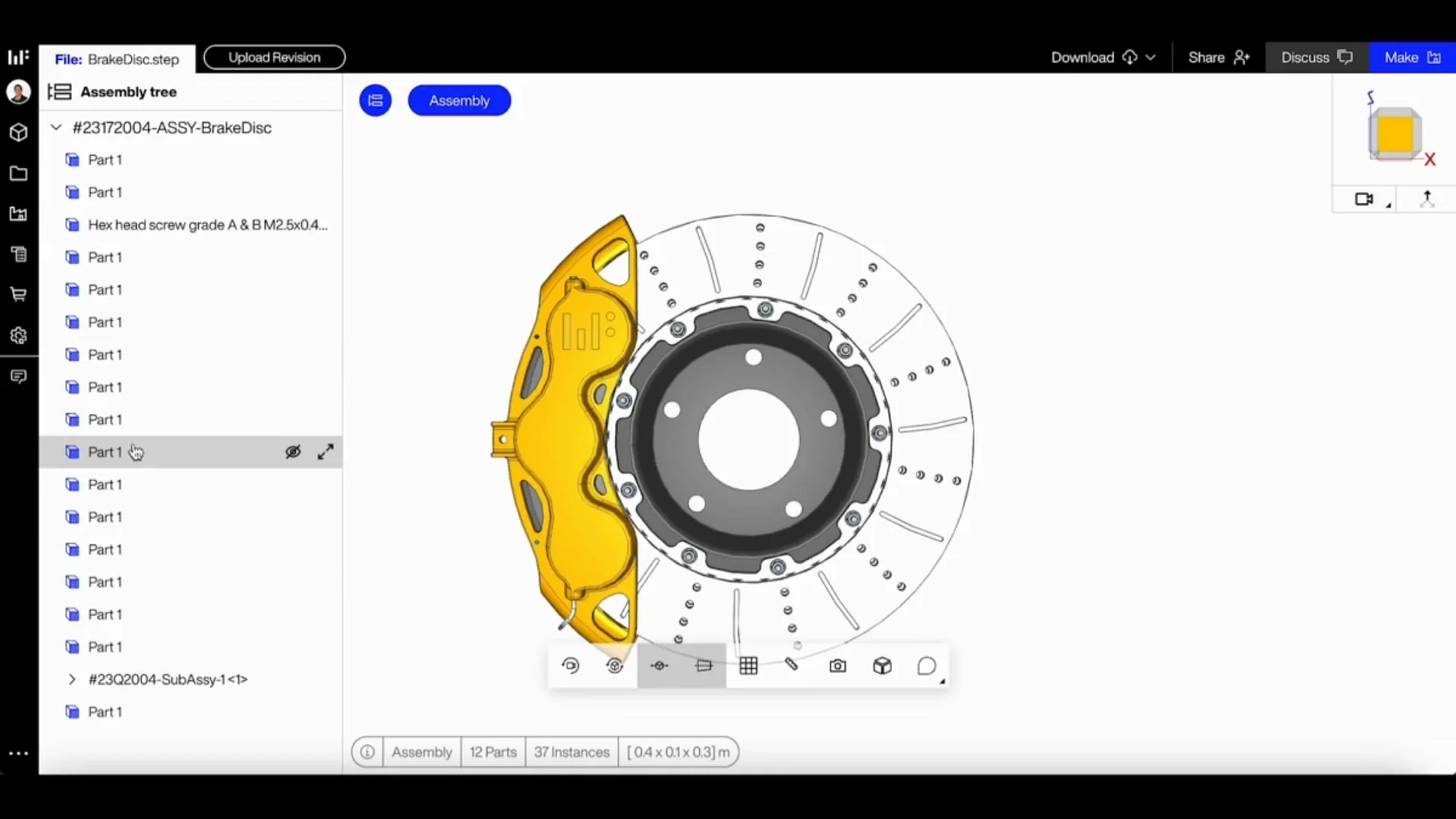
An assembly tree in CAD Rooms browser
Pros: It is completely cloud-native, so there is no on-premises infrastructure to maintain. It natively supports over 35 CAD formats, so you don't have to switch your core design tools. It includes a convenient browser viewer for non-CAD stakeholders.
Cons: Unlike heavy legacy software, it lacks the deep, advanced product lifecycle management (PLM) tracking and enterprise resource planning integrations.
Pricing: Starting at $75 per user, per month.
4. Onshape
If you're open to rethinking your entire design pipeline, consider Onshape. It's a cloud-native platform where CAD tools and PDM capabilities are integrated into the same browser environment.
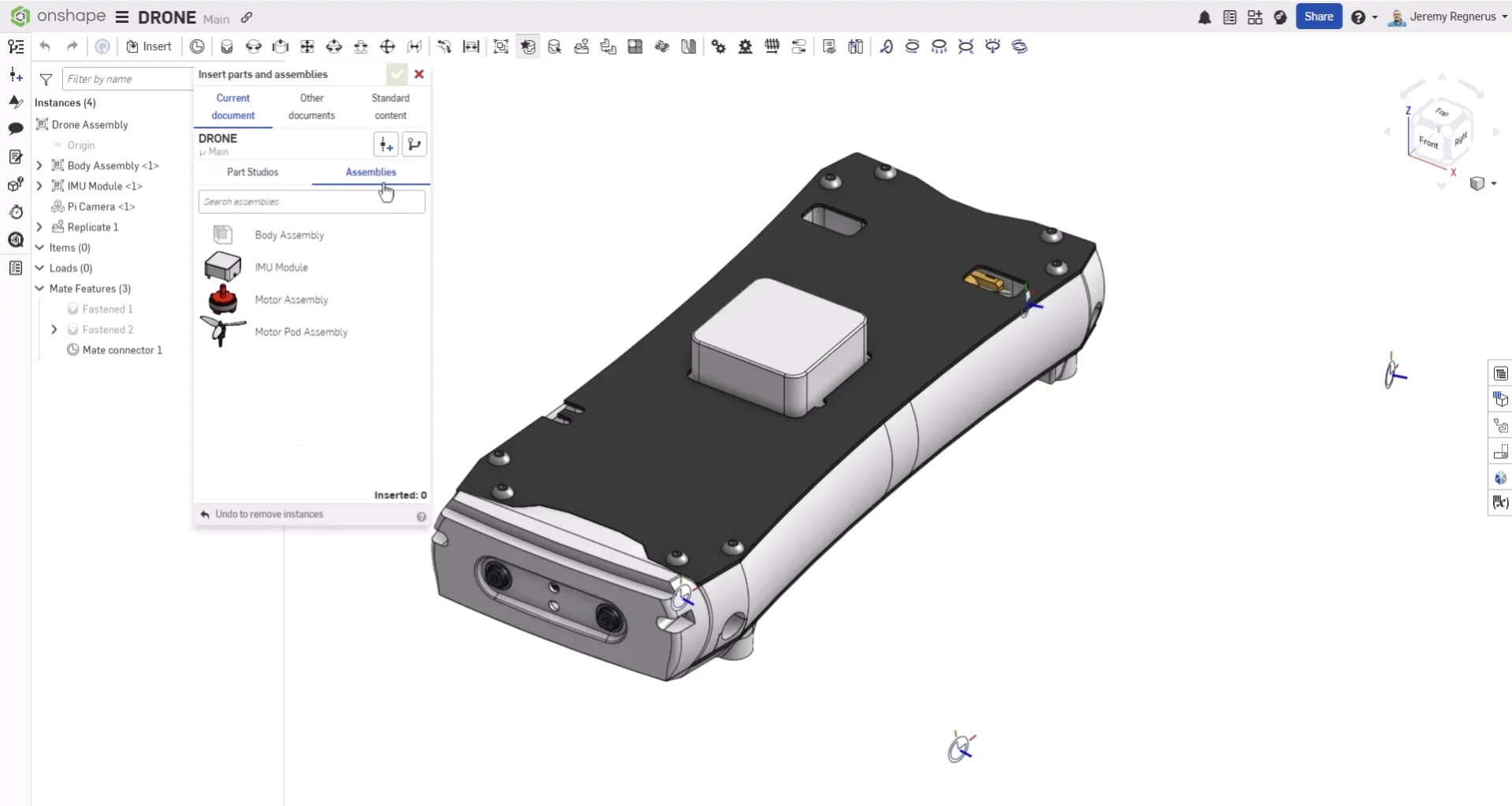
Onshape a drone project assemblies
Pros: There are no files to check in or out because everything updates in real time. There is zero IT deployment overhead, and it features concurrent multi-user editing.
Cons: There is total vendor lock-in, and you cannot easily use local, offline SolidWorks files. You must fully commit to modeling within Onshape's browser workspace.
Pricing: Free plan available with standard plant starting at $1,500 per user, per year.
5. Subversion (SVN) with TortoiseSVN (The Free/Open Source Option)
If you want something robust and completely free, you go old school. SVN is the classic, reliable choice for version control.
A project managed with SVN Client
Pros: It's rock solid, infinitely configurable, and free. It has a huge library of documentation and plugins. "Tortoise" provides a right-click interface in Windows.
Cons: There is no “CAD intelligence.” It doesn't natively understand assembly dependencies, so you have to manage that logic yourself. Its interface is not as “pretty” as modern SaaS interfaces.
Price: Free.
FAQ
Is there a "best" PDM for a remote team?
If your team is scattered around the world, avoid anything that requires an on-premises local server (like traditional SolidWorks PDM) unless you have a top-tier VPN or cloud bridge. Cloud-native or cloud-syncing tools, such as Anchorpoint and Onshape, are superior because they handle synchronization and file locking over the internet, eliminating the need for your IT department to open your local network.
Is it hard to migrate my existing data?
It depends on how messy your current folder structure is. If you simply copy and paste files into a new system, all your broken links will carry over. Most migrations require you to "pack and go" your assemblies into the new environment or use the tool's proprietary import utility to map the relationships. It's a bit of a weekend project, but it's the perfect opportunity to clean up those "FINAL_Final" folders you've been ignoring for years.
Can I really use Git or SVN for SolidWorks files?
Technically, yes, but proceed with caution. Git and SVN are great for text-based code, but they aren’t "CAD-aware." They don't natively understand how an assembly file references a part file. If you use them, you often end up with binary files, which makes it difficult to see the differences between versions. Use them if you want free versioning, but stay organized with your assembly structures to avoid broken links.