In this article we analyze the pros and cons of plain Git, Anchorpoint, Perforce, and Subversion for CAD-based projects.
George Neguceanu
29 Apr 2026
Updated on
29 Apr 2026
8
min read
Content
Managing CAD files can sometimes feel like a high-stakes game of "Don't Delete the Wrong Version." Whether you’re working on an architectural project in FreeCAD or modeling parts in other CAD software, you've probably encountered the nightmare of having too many versions of the same file.
If you use FreeCAD, Rhino, Solidworks or AutoCAD, then you know that CAD files tend to be large and complex. They are also prone to breaking if two people access them simultaneously. Unlike code, you can't simply "merge" two versions of a 3D gear. You need a system that understands how artists and designers work, not just how programmers write scripts. That's where version control comes in.
Git, Anchorpoint, Perforce, and Subversion can all effectively manage a CAD project
Why even use version control?
Think of version control as a "checkpoint" for your CAD project. If you make a mistake or a file becomes corrupted, you can easily revert to an earlier state. This feature solves several major problems, such as:
File Distribution: Making sure everyone on the team has the exact same version of an asset.
Communication: Providing the context needed to review an asset before it's finalized.
Friction: Reducing human error in complex projects with many moving parts.
Project history: Each "checkpoint" / commit comes with a message, author, and date, providing a clear overview of your project.
Centralized vs. Decentralized
Choosing the right version control system requires understanding the fundamental divide between centralized and distributed architectures. Here is a breakdown of the two:
Centralized Version Control Systems (CVCS)
Commonly utilized in enterprise environments and legacy systems, tools like Perforce rely on a single, central server to manage the history of a project.
Pros: These systems excel in large-scale operations. They offer granular file/folder permissions, superior management of massive binary assets through file locking, and a centralized structure that enforces strict corporate workflows.
Cons: They rely on a single point of failure; if the server goes down, development grinds to a halt. They generally lack offline capabilities, make complex branching and merging cumbersome, and often come with high overhead and maintenance costs.
Distributed Version Control Systems (DVCS)
Modern systems like Git have become the industry norm by decentralizing the repository, giving each developer a full copy of the project history.
Pros: These systems are built for speed and resilience. Because every user has a complete local repository, work can continue offline. They support rapid branching/merging pipelines and provide a versatile, open-source ecosystem that is highly cost-effective.
Cons: Having a full local copy increases storage requirements. These systems have historically weaker native access controls and struggle with large binary files unless extended with tools like Git LFS. Furthermore, they often present a steeper learning curve for non-technical team members who lack an intuitive GUI, unless dedicated Git clients are used.
Top version control solutions for CAD
Git (The Gold Standard CLI)
Think of plain Git as the "do-it-yourself" engine of the dev world. You're working straight from the command line (CLI), no frills attached. If you’re dealing with big assets, you'll definitely need to slap on Git LFS to keep things running smoothly.
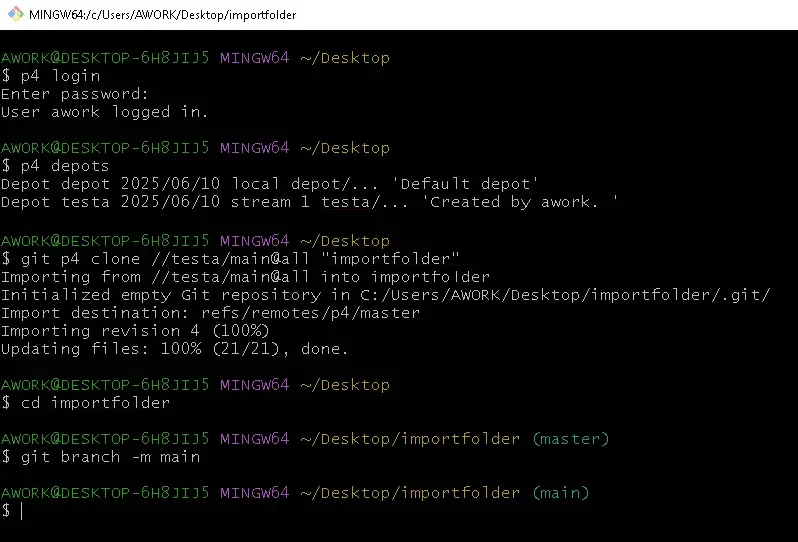
Using Git CLI to import a Perforce project to Git
Pros: It's free, blazing fast, and gives you total control. You aren't tied to any company or cloud provider until you decide to push your code.
Cons: The learning curve is brutal if you’re new. If you mess up a rebase or a merge without a visual map, you’re gonna have a bad time. Plus, you'll need extra tools if you want to actually manage pull requests or have a proper code review.
Anchorpoint (The Creative's Best Friend)
Anchorpoint is basically Git with a makeover. It's built specifically for game devs, artists, and CAD designers who need a nice interface. It hides all the scary command-line stuff and gives you things that actually make sense for visual work, like file locking, thumbnails and previews.
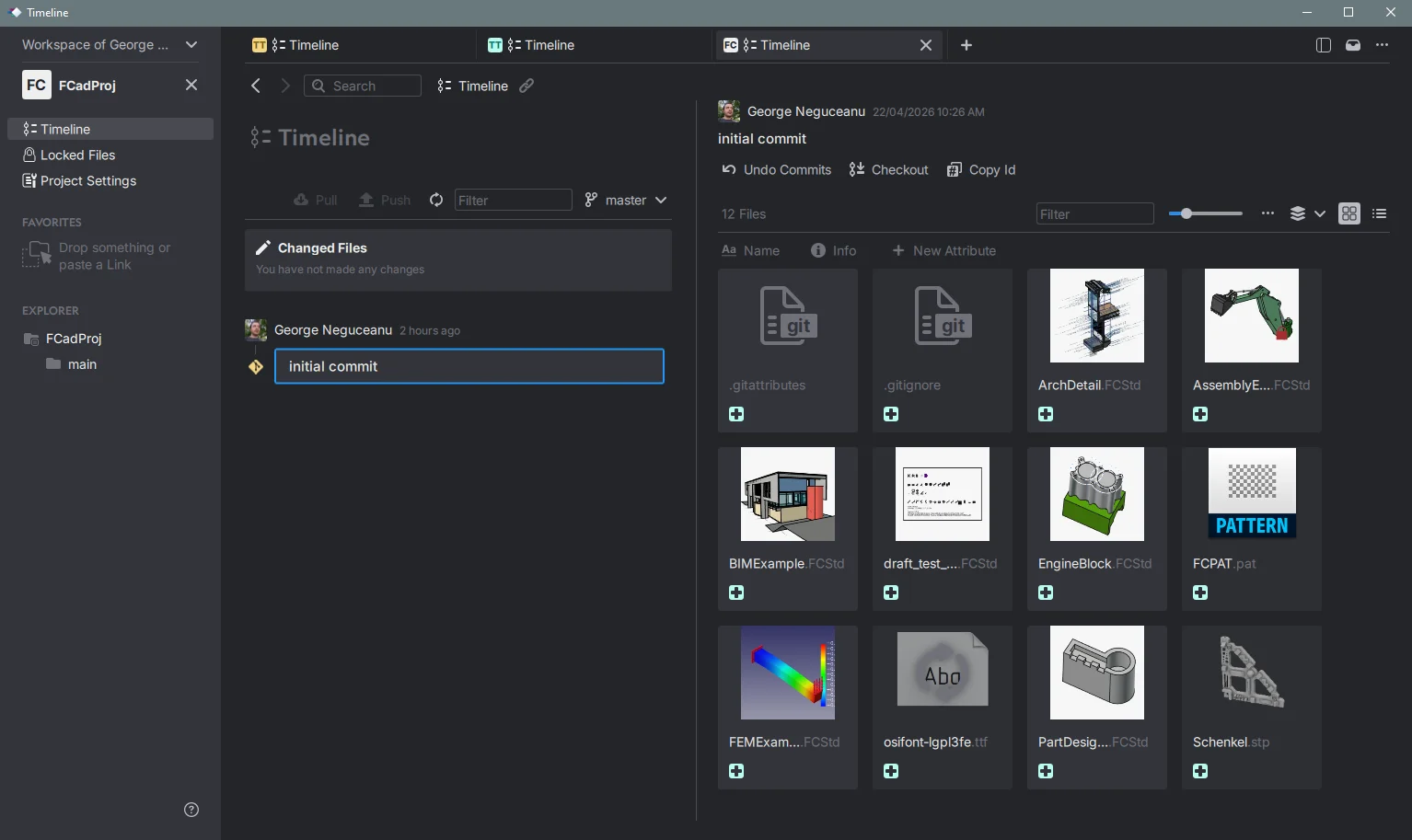
Managing a FreeCAD project with Anchorpoint
Pros: It’' super intuitive. You get file locking, visual task management, and it handles big binary files way better than standard Git does. It's a lifesaver for teams where half the people aren't coders.
Cons: It's designed for creative pipelines, so if you're a "pure" software dev, it might feel like overkill. Also, you're still limited by Git's somewhat loose access controls.
Perforce (The Enterprise Beast)
If you're working for a massive studio with a project the size of a small country, you're probably using Perforce. It is the heavyweight champion for handling millions of files and massive binary data.
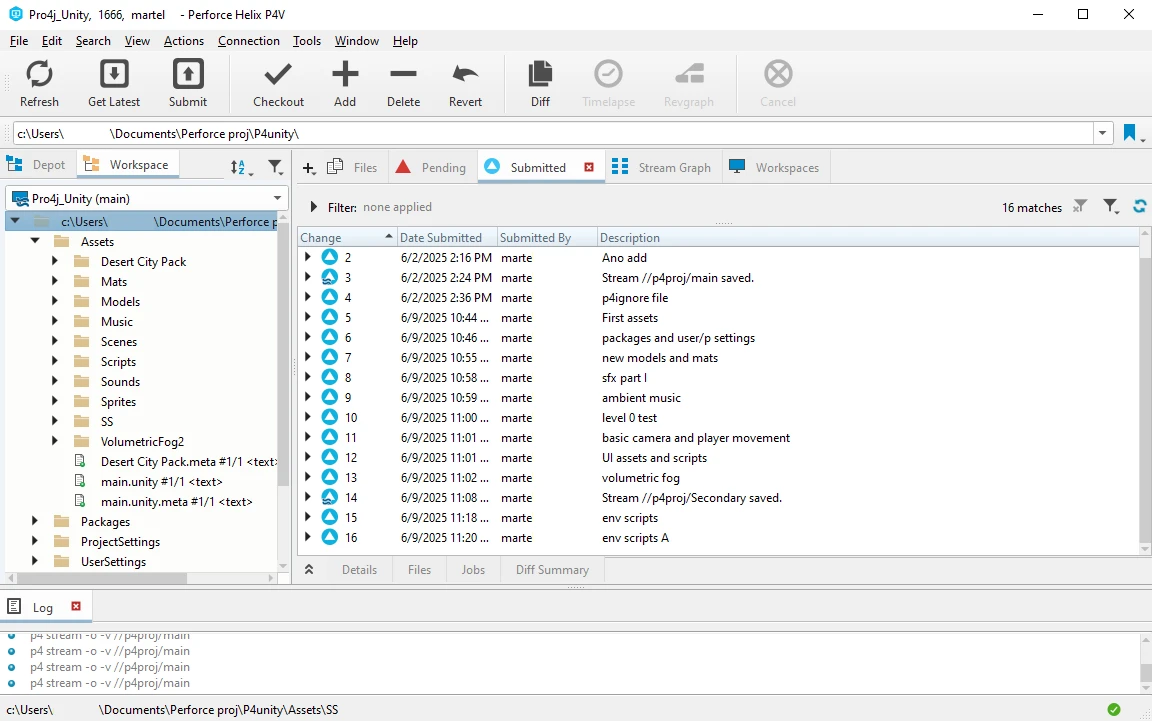
Managing a Unity project with Perforce P4V
Pros: It's a tank. It handles global teams with ease, has rock-solid file locking, advanced access controls and won't buckle under the weight of terabytes of data.
Cons: It's centralized, meaning if the server goes down, you're basically camping until IT fixes it. It's also expensive and high-maintenance, so it's usually overkill for small teams or hobbyist projects.
SVN (The Reliable Old-Timer)
Subversion (SVN) has been around forever. It's not flashy, and it's definitely not the fastest, but it's a "what you see is what you get” system. It's great if you want a linear history that doesn't require a PhD in computer science to understand.
Managing a project with SVN Syncro Client
Pros: It's simple, free, and feels very straightforward. If you're a smaller team that just needs to keep files in order without the headache of Git's branching complexity, this is a solid, honest choice.
Cons: Creating branches in SVN is a bit clunky, and since everything funnels through a central server, it can really drag once your project history gets massive.
Recommendations
Choosing the right version control system for CAD ultimately boils down to a balance between your team’s size, the type of files you’re pushing, and how much "technical overhead" you’re willing to manage. If you're a pure software shop, Git is the undeniable industry standard. If you’re a game studio or a creative team juggling 3D models and large textures, Anchorpoint brings much-needed usability to the Git ecosystem, while Perforce remains the undisputed king of large-scale enterprise projects where file locking is non-negotiable. If you’re keeping things small and simple, SVN is still a reliable, no-nonsense tool that gets the job done.
FAQ
Can my team use both Git and Perforce?
Technically, yes, but it is rarely a good idea. Using two different systems for the same project creates a fragmented source of truth, doubles your maintenance work, and confuses the team. Pick the one that fits your primary project type and stick to it.
Is Git really "too hard" for artists?
It's not necessarily that it's too hard, but rather that it's designed for lines of code, not artistic assets. Artists usually need features like file locking (to prevent two people from working on the same file) and visual file previews. Using a client like Anchorpoint solves most of these pain points without the artist ever needing to touch a terminal, but if is needed by the Dev Ops, you also get access to one.
If I have a small team, should I just use the "best" enterprise tool?
Not necessarily. Enterprise tools like Perforce often require a dedicated server, complex configuration, and expensive licensing. For small teams, Git (with a client like GitHub Desktop / SourceTree / Anchorpoint) or SVN offers far more freedom without the administrative baggage.
Why does everyone complain about Git and "binary files"?
Git was built to track "delta changes" in text files, basically it looks at what lines of code changed. Binary files (like textures, 3D models, or audio) don't have code/text "lines", so Git tries to store the entire file every time it changes. Without an extension like Git LFS, your repository will quickly grow so large that it becomes unusable. Solutions like Anchorpoint take care of this automatically without the need of extra configurations.
Which one should I choose if I work remotely?
A distributed system compatible with Git is almost always superior for remote teams. Because everyone has a local copy of the repository, you can stay productive offline, and your workflow isn't tethered to a single, potentially unstable company server.